This article explains how the WP Umbrella security score is calculated and how to read it. It covers each pillar of the score (known vulnerabilities, malware, hardening and access, site health, Site Protect and the activity log), the cap applied when malware is confirmed, how dismissed alerts are treated, and the A to F grade shown across the dashboard.
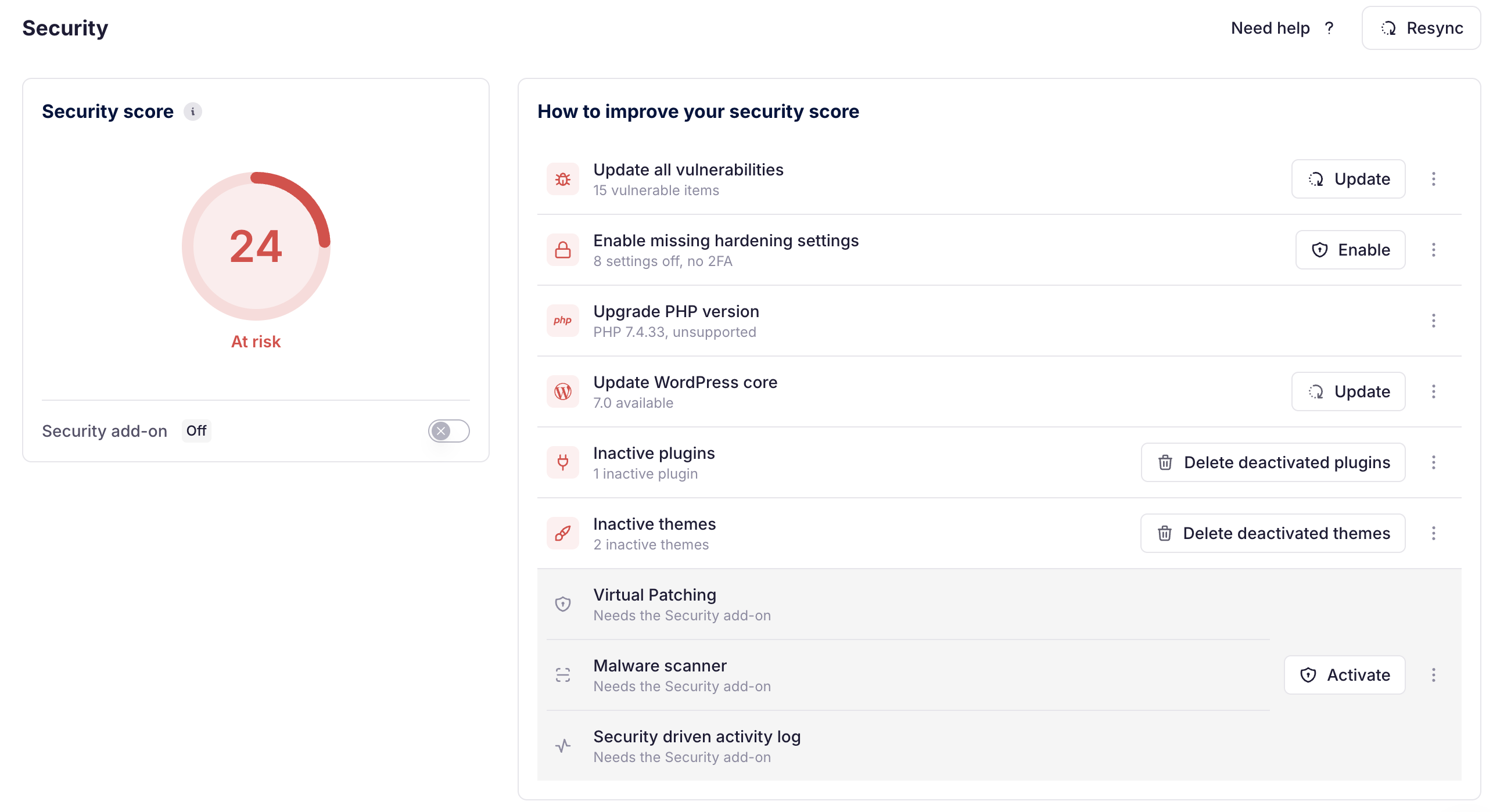
The Security Score estimates how well a WordPress site is protected against known security risks, on a scale from 0 to 100.
The score adds up two parts:
Security hygiene (85 points): what every site can achieve on its own, by fixing vulnerabilities, keeping malware scans clean, hardening WordPress and keeping the site healthy.
Active protection (15 points): the Site Protect firewall and the activity log, provided by the security add-on.
A well-maintained site without the add-on can reach 85 (grade B). Grade A (90 and above) requires active protection.
The score now takes confirmed malware into account. A high score is still not a guarantee: it reflects what WP Umbrella can detect today, not every possible risk.
The score is the sum of six pillars. Four of them (85 points) are available to every site, the last two (15 points) require the security add-on.
On top of the pillars, confirmed malware caps the total score at 20 (see Score cap below).
Pillar | What it checks | Max points | Requires add-on |
|---|---|---|---|
Known vulnerabilities | Plugins, themes and WordPress core | 30 | No |
Malware | Confirmed detections, files to review, scan freshness | 20 | No |
Hardening and access | Hardening options, admin 2FA, hidden administrator accounts | 15 | No |
Site health | SSL, WordPress version, PHP version, WP_DEBUG, inactive plugins and themes | 20 | No |
Site Protect (firewall) | Patchstack virtual patching | 10 | Yes |
Activity log | Activity log enabled, unresolved anomalies | 5 | Yes |
Known vulnerabilities are publicly documented security issues in plugins, themes or WordPress core. They are actively targeted by automated attacks and remain the main entry point for WordPress compromises.
Each vulnerability removes points from this pillar:
Severity | Score impact |
|---|---|
Critical | -25 |
High | -15 |
Medium | -6 |
Low | -2 |
The pillar cannot go below 0, so vulnerabilities cost at most 30 points.
With Site Protect enabled, vulnerabilities still count, but only 30% of their penalty is applied. For example, one high vulnerability costs 15 points without Site Protect and 4.5 points with it. Virtual patching reduces the risk; it does not replace updating.
Malware means the site may already be compromised, so it weighs directly on the score.
Situation | Score impact |
|---|---|
Malware confirmed | Pillar drops to 0, and the total score is capped at 20 |
File to review (suspicious, not confirmed) | -8 per file |
Last malware scan older than 7 days | -5 |
Hardening options and admin access controls limit what an attacker can do, even when another weakness exists.
Hardening options: up to 11 points, in proportion to the hardening options enabled among those available to the site. IP blocking is only available with the security add-on, so it is not counted for sites without it.
Two-factor authentication enforced for administrators: +4 points.
Hidden administrator account detected: the whole pillar drops to 0. A hidden admin account is a common sign of compromise.
Outdated software and misconfigurations weaken the security baseline of a site. Unsupported PHP or WordPress versions no longer receive security fixes, and other settings can amplify the impact of a vulnerability.
Check | Points |
|---|---|
SSL (HTTPS) enabled | 6 |
WordPress core up to date | 5 |
Supported PHP version | 4 |
WP_DEBUG disabled | 3 |
No inactive plugins or themes | 2 |
Site Protect blocks known exploit attempts at the server level using Patchstack virtual patching. It protects the site before updates are applied.
Status | Points |
|---|---|
Enabled | 10 |
Disabled | 0 |
Site Protect also reduces the vulnerability penalty to 30% (see pillar 1).
The activity log records what happens on the site and flags unusual behavior, so suspicious activity can be spotted and handled quickly.
Activity log enabled: 5 points.
A critical anomaly is open: -3 points.
Otherwise, each open alert: -1 point, up to -2.
When malware is confirmed, the total score cannot exceed 20, whatever the other pillars add up to. A good score elsewhere should not hide an infected site.
Dismissing an alert marks it as an accepted risk. Some choices are legitimate (WP_DEBUG on a staging site, a plugin kept inactive on purpose), so dismissing them restores the points. Others still carry part of their risk.
Dismissed alert | Points restored |
|---|---|
WP_DEBUG enabled | All |
Inactive plugins or themes | All |
No SSL | Half |
WordPress core outdated | Half |
Unsupported PHP version | Half |
Malware or activity log anomaly | All: dismissing counts as a verdict that it is not a threat |
Hygiene           = vulnerabilities (30) + malware (20) + hardening and access (15) + site health (20)
Active protection = Site Protect (10) + activity log (5)
Cap               = 20 if malware is confirmed, otherwise 100

Security score = min(hygiene + active protection, cap)The same A to F scale is used everywhere in the dashboard: site list, security page and site overview.
Grade | Score |
|---|---|
A | 90 and above |
B | 75 to 89 |
C | 60 to 74 |
D | 40 to 59 |
F | Below 40 |
Unless stated otherwise, everything else on the site is in good shape: Site Protect and activity log enabled, hardening complete, recent malware scan.
Situation | Score | Grade |
|---|---|---|
Everything enabled and in good shape | 100 | A |
No vulnerabilities, full hardening and admin 2FA, but no security add-on | 85 | B |
No add-on, 3 of 8 hardening options, no admin 2FA | 74 | C |
No add-on, 1 high vulnerability | 70 | C |
With add-on, 1 high vulnerability | 96 | A |
With add-on, 3 high vulnerabilities | 87 | B |
No SSL, no Site Protect, 1 medium vulnerability | 78 | B |
Hidden administrator account detected | 85 | B |
Malware confirmed (3 infected files) | 20 | F |
No add-on, 2 high and 3 medium vulnerabilities, no hardening, outdated WordPress and PHP, no recent scan | 24 | F |
The global score is the average of all site scores in your dashboard.
