The firewall secures your sites with real-time virtual patching powered by Patchstack. It prevents known vulnerabilities in WordPress core, plugins, and themes from being exploited, even when the fixing update hasn't been released or applied yet.
You get serious protection across all your client sites, without installing a separate security plugin or configuring anything.
✅ No code changes
✅ No performance impact
✅ No maintenance headaches
⏱ Estimated time to enable: 1–2 minutes
🛠 Prerequisites:
WP Umbrella plugin installed and activated on your WordPress site
Access to your WP Umbrella account
Active Security add-on (+2€/month per site)
Virtual patching is like applying a temporary fix without changing any code. Say a plugin has a critical vulnerability, but the developer hasn't released an update yet, or you can't update right away because of client constraints. Virtual patching blocks the exploit at runtime, protecting your site while you wait to update.
It buys you time, reduces stress, and adds a critical layer of defense between your sites and the bad guys.
Protection | What it does | Why it matters |
Vulnerability virtual patching | Automatically blocks exploitation of known vulnerabilities in WordPress core, themes, and plugins | Protects your sites before updates are applied or even released |
Common attack vectors | Blocks known attack patterns: file access probes (readme.txt, license.txt, debug.log), attempts to reach wp-config.php, exploit payloads | Stops the automated attacks that hit every WordPress site, every day |
Proxy comment posting | Disables comments posted through third-party services and scripts | Reduces comment spam and abuse attempts |
Some examples of what the firewall stops automatically:
Exploitation of unpatched plugin, theme, and core vulnerabilities
File access probes like readme.txt, license.txt, debug.log
Access attempts to sensitive files like wp-config.php
Proxy comment spam from third-party tools and scripts
Looking for user enumeration blocking, XML-RPC restriction, or security headers? Those protections are now part of Security Hardening, where each one is a per-site toggle you control, instead of an invisible background rule.
When you enable the Security add-on on a site:
A lightweight helper plugin (powered by Patchstack) is installed automatically.
It monitors your site at the PHP level and blocks known vulnerabilities and attack patterns at runtime.
Security rules are continuously updated from Patchstack's threat database, maintained by their team of researchers and ethical hackers.
No files are modified, and there is zero impact on your frontend speed.
Protection is active instantly. Toggle it on, and you're done.
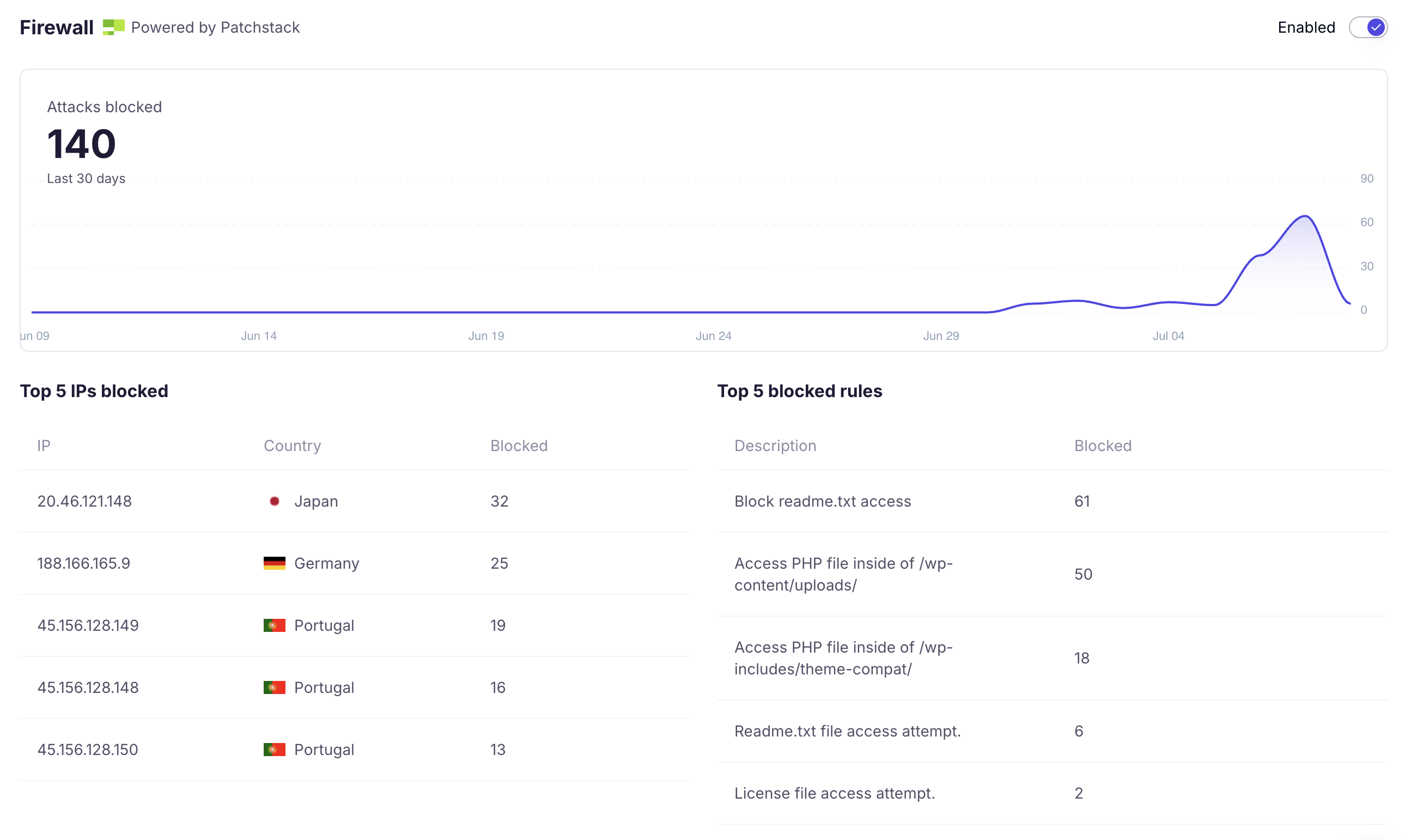
Protection you can't see is hard to trust, and hard to show clients. The firewall now reports its work.
Go to the Security tab of any protected site to find the firewall insights view:
Attacks blocked over the last 30 days, charted over time
Top blocked IPs, with their country of origin
Top blocked rules: which protections fire most (file access probes, plugin exploit blocks, and so on)
This gives you full transparency, and something concrete to show clients when they ask what their care plan actually does.
Two options:
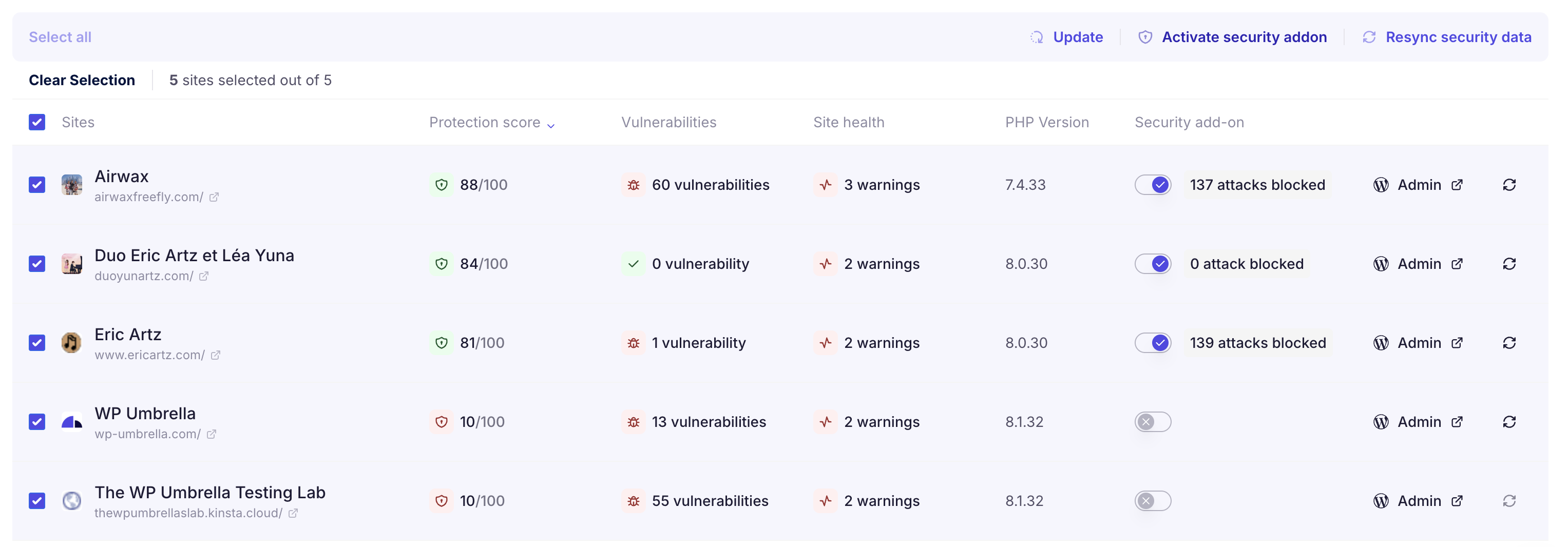
In bulk: from the main dashboard or the security bulk view, enable the Security add-on across your sites in one action. You'll see the number of sites and the total monthly cost before confirming.
Site by site: go to the Security tab of a specific website and toggle the add-on on.
Enabling the add-on turns on the firewall, the recommended hardening options, and the Security-Driven Activity Log together, with sensible defaults you can adjust per site.
Most security plugins rely on bulky scanning engines and firewalls that add database overhead, create false positives, slow down your site, and require configuration. The WP Umbrella firewall does none of that. It's lightweight, silent, and doesn't touch your code. It runs at the PHP level and blocks specific behaviors before they can be exploited, which makes it a good fit for high-performance sites and agencies managing many clients.
No. The helper plugin doesn't scan files or process large datasets. It blocks known patterns at the PHP execution level. Performance impact is effectively zero, even across hundreds of sites.
Automatically and continuously. We sync with Patchstack's real-time vulnerability database, so you always run the most recent virtual patches without lifting a finger.
Yes, it's designed to be non-conflicting. You can run it with hosting-level firewalls (like Cloudflare or Sucuri), security monitoring plugins, and anything else you rely on. That said, many agencies find they can retire their traditional security plugins entirely: between the firewall, hardening, and the Security-Driven Activity Log, the real-world attack vectors are covered without the extra weight.
No. It buys you time and protects you during the gap between a vulnerability's disclosure and your update, but the durable fix is always the update itself. Pair the firewall with WP Umbrella's safe updates and vulnerability monitoring (included on every account) for the full workflow.
The virtual patching rules are removed, the helper plugin is uninstalled from your site, and the site becomes reliant on plugin, theme, and core updates for protection. You can re-enable it anytime; all rules are applied again immediately with no setup.
