Staying ahead of downtime issues is essential for running a successful online business. The best way to do that? Reliable, regular monitoring that alerts you before customers even notice a problem—and WP Umbrella has you covered! 😊
WP Umbrella lets you monitor your WordPress site every 2 to 30 minutes so you can catch and address issues quickly.
Estimated Time to Complete: 2 minutes
Prerequisites: A WP Umbrella account with at least one linked website
Click on the website you want to adjust.

Once inside in Uptime monitor tab, you can define:
Ping interval (monitoring frequency): Choose how often we should check your site (from every 2 to every 60 minutes).
Monitoring region: Select the geographical location where you want the checks to come from (this can affect average response time).
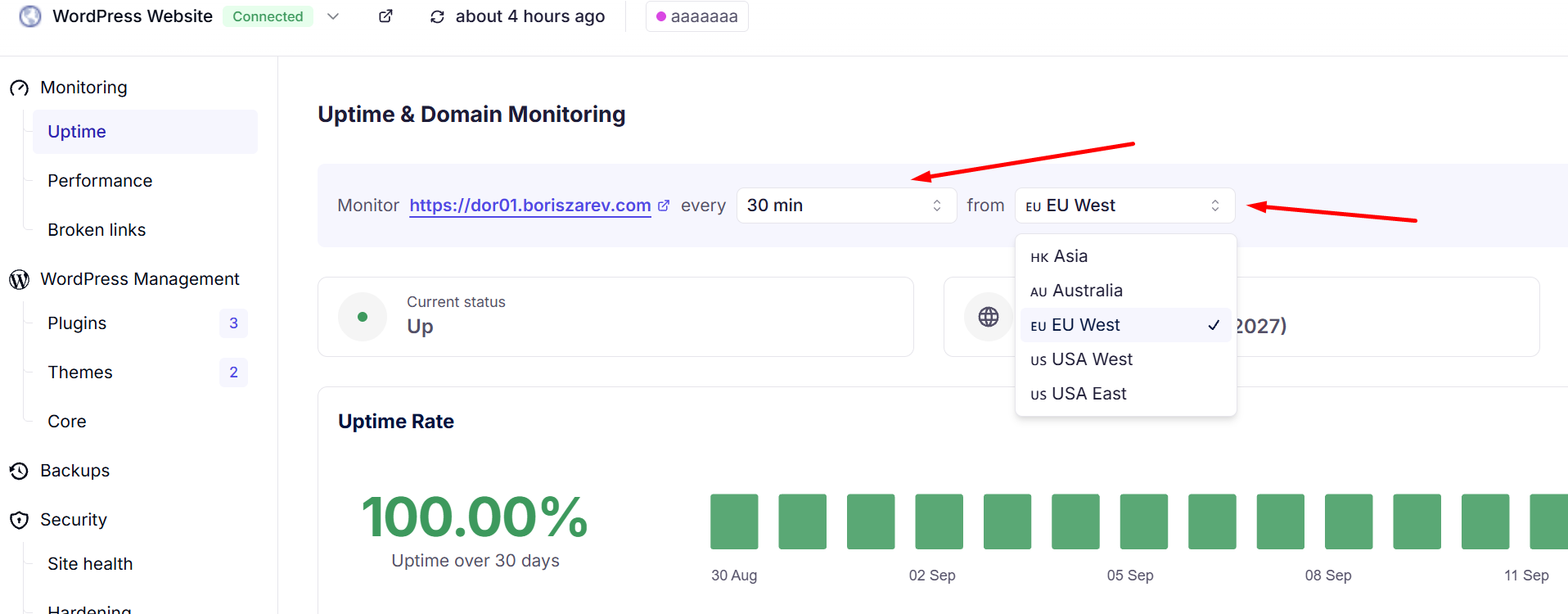
🌍 Tip: Picking a region close to your primary audience will give you more accurate response times.
After making your selections, the changes will be automatically saved. ✅
Currently, 2 to 60 minutes are the available intervals.
Yes, it may influence your average response time based on the distance between the monitoring server and your site.
WP Umbrella will send an email alert to notify you immediately, if you haven’t enabled your alerts for uptime monitor, please go to the Alerts tab and enable it.
Absolutely! Each website in WP Umbrella can have its own unique monitoring frequency and region settings.
Being proactive about uptime monitoring helps protect your brand’s reputation and ensures a smooth user experience. With WP Umbrella’s customizable monitoring frequency, you’re always one step ahead of issues. 👏
If you need assistance or have questions, don’t hesitate to contact our support team—we’re always here to help! 💬✨
